
ゆっくりAI勉強会 第22回レポート:Claude Code “答えるAI”から“働き続けるAI”へ。
ゆっくりAI勉強会 第22回レポート
~ “答えるAI”から“働き続けるAI”へ―Claude Codeを学ぶ ~
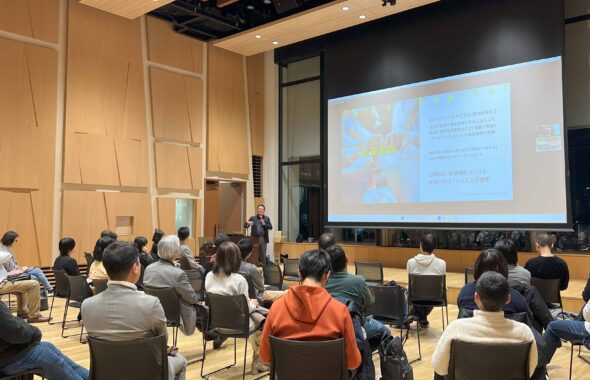
港区を起点にいろんなところで働く・暮らす、楽しい時間を創りたい人たちによるコミュニティ Creative Guild。AI技術のトレンドを学びながら、参加者同士の交流を深める企画「ゆっくりAI勉強会」。 2026年6月17日に開催した第22回のテーマはClaude Code。どんなツールなのか、これまでのチャット型AIと何が違うのか、そして仕事にどう活かせるのかを、デモと対話を交えながら学びました。
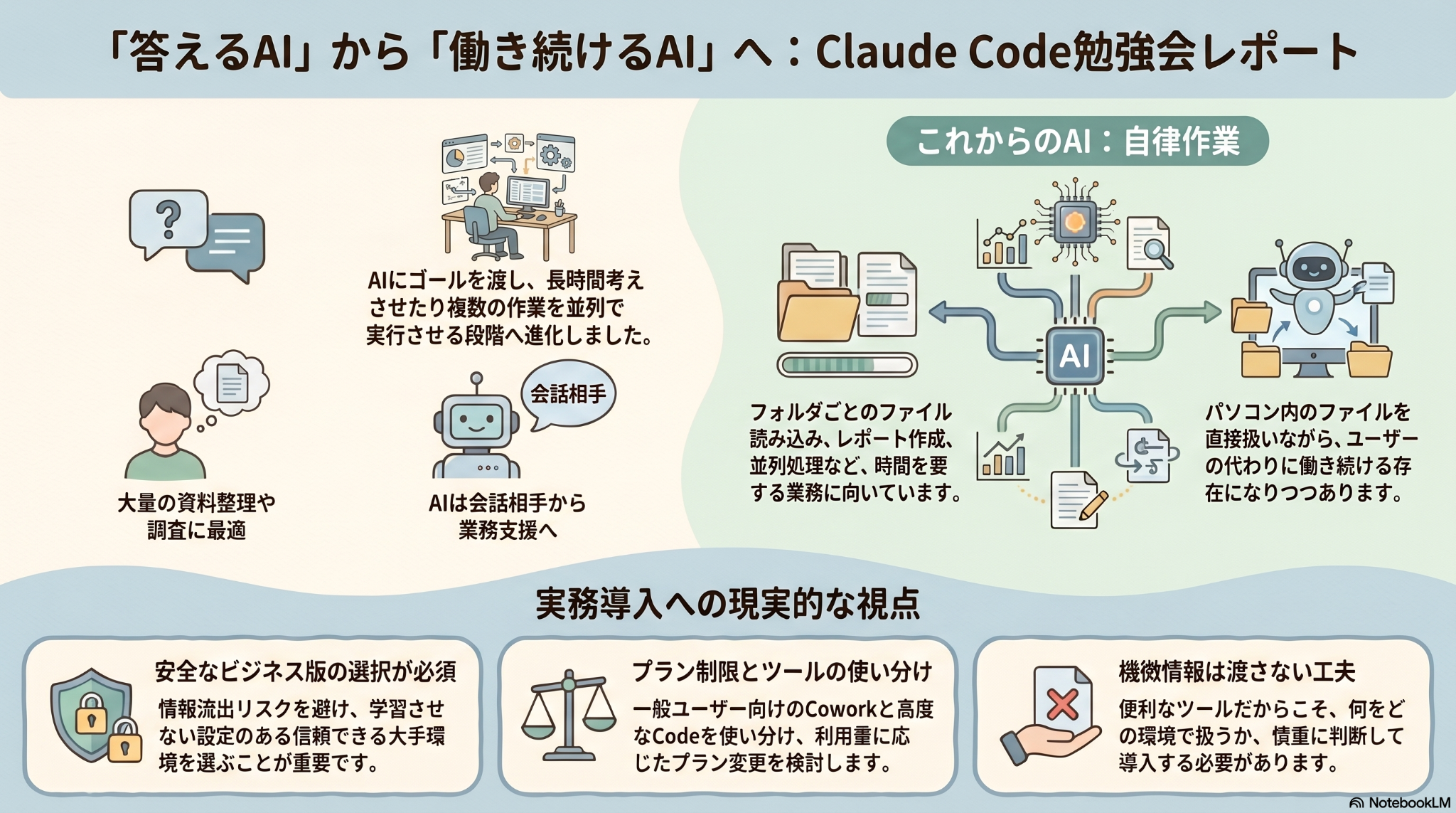
今回のキーワードは、“答えるAI”から“働き続けるAI”へ。これまでの生成AI活用は、チャット画面に質問を投げかけ、返ってきた答えをもとに人間が次の作業を進める使い方が中心でした。一方で、Claude CodeやClaude CoworkのようなAIエージェント型のツールでは、ゴールや資料、作業環境を渡すことで、AIが計画を立て、ファイルを読み、編集し、必要に応じて複数の作業を進めていくようになります。
もちろん、AIが突然なんでも正しくやってくれるようになったわけではありません。むしろ大切なのは、人間側が仕事の目的、前提条件、参照資料、出力形式、確認ポイントをどう設計するかです。今回の勉強会は、Claude Codeの機能紹介にとどまらず、AIに仕事を“丸投げ”するのではなく、どうすれば安全に、実務の中でうまく任せられるのかを考える時間になりました。
Claude Codeとは何か
Claude Codeは、Anthropicが提供するAIエージェント型の開発支援ツールです。公式ドキュメントでは、コードベースを読み、ファイルを編集し、コマンドを実行し、ターミナル、IDE、デスクトップアプリ、ブラウザなど複数の環境で利用できるツールとして紹介されています。開発者向けの印象が強いツールですが、今回の勉強会では、単にプログラミングだけの話ではなく、資料整理、レポート作成、Web制作、リサーチ、スライド生成など、より広い仕事の進め方にも通じる可能性として扱いました。
チャット型AIとの大きな違いは、やり取りの単位です。チャット型AIでは、人間が一つひとつ質問を区切り、必要な情報を都度渡しながら進めます。一方でClaude Codeのようなツールでは、フォルダやプロジェクトの中にあるファイル群を前提に、AIが一定時間、連続的に考えながら作業を進めることができます。つまり、AIに渡すものが「一つの質問」から「ひとまとまりの仕事」へ広がっているのです。
デモで見えた、AIに仕事を任せる流れ
当日のデモでは、PDF資料やテンプレートを同じフォルダに置き、Claude Codeに読み込ませながら、資料生成のような作業に取り組む流れが紹介されました。ここで重要だったのは、いきなり作業を開始させるのではなく、まずプランモードで進め方を確認することです。
AIに大きな仕事を渡すとき、最初の設計が曖昧だと、途中で方向がずれたり、期待と違う成果物が出たりすることがあります。そこで、まずAIに「どの資料を見て、どの順序で、どのような成果物にするのか」を計画させ、人間がその計画を確認してから実行に移る。このひと手間が、実務での品質と安心感を高めるポイントになります。
この感覚は、これまでの「プロンプトを書く」スキルともつながっています。ただし、Claude CodeのようなAIエージェント型ツールでは、プロンプトは単なる命令文というよりも、業務設計の入口になります。何を読ませるのか、何を除外するのか、どの形式で出力するのか、どの段階で確認を挟むのか。そうした条件を整えること自体が、AI時代の仕事の設計になっていきます。
参加者の関心は、実務でどう使うかへ
今回の勉強会では、参加者からの質問も非常に活発でした。「Claudeは使っているけれど、Claude Codeはまだ使っていない」「CoworkとCodeは何が違うのか」「有料プランではどのくらい使えるのか」「実際の仕事でどこまで任せられるのか」といった声があり、AIを“試してみる”段階から、“実務にどう組み込むか”を考える段階へ関心が移っていることが感じられました。
料金プランや使用制限についても、具体的なやり取りがありました。AIエージェント型のツールは、単発のチャットよりも長時間動き、多くのファイルを読み、複数の処理を行うため、当然ながら計算資源を多く使います。そのため、利用量や作業内容によっては制限に達しやすくなることもあります。ここで大切なのは、「高いか安いか」だけで判断するのではなく、どの作業をどれだけAIに移管できるのか、どのプランなら実務上の投資対効果が合うのかを考えることです。
また、CoworkとClaude Codeの違いについても話題になりました。Claude Codeは開発者やより高度な操作をしたい人に向いたツールとして理解しやすく、Coworkは一般的な知識労働やオフィスワークに近い作業を、より自然な画面や操作感で進めやすいものとして捉えることができます。どちらが上というよりも、誰が、どの仕事を、どの操作感で進めたいのかによって選び方が変わるということです。
セキュリティと情報管理は避けて通れない
今回、特に実務的だったのがセキュリティに関する議論です。参加者からは、クライアント資料や機微な情報を扱う場合、個人利用の環境で安易に使ってよいのかという問いも出ました。これは、AI活用が本格的に仕事へ入ってきたからこそ避けて通れないテーマです。
Claude CodeやCoworkのように、ローカルファイルやクラウド上の資料、業務ツールと接続しながら働くAIは、とても便利です。一方で、便利になるほど、どのデータを、どの環境で、どこまで扱わせるのかという判断が重要になります。野良の無料AIに機密情報を入れないこと、個人情報や顧客情報は必要に応じてマスキングすること、会社として利用ルールを整えること、ビジネス向け・エンタープライズ向けの環境を検討することなど、技術だけでなく運用面の設計も欠かせません。
ここで大切なのは、AIを「絶対安全」か「危険だから使わない」かの二択で捉えないことです。メール、クラウドストレージ、SaaSなどと同じように、実務の中で使う以上、リスクはゼロにはなりません。だからこそ、リスクを理解したうえで、情報区分、権限、承認、確認の仕組みを整えながら使うことが必要です。AI活用は、ツール導入であると同時に、情報管理と業務設計の見直しでもあります。
“働き続けるAI”の時代に必要な、人間側の力
今回の学びを整理すると、Claude Codeの価値は「何でも自動化できること」ではなく、人間がより大きな単位で仕事を設計し、AIに任せられるようになることにあります。AIがファイルを読み、計画を立て、一定時間作業を続けられるようになるほど、人間の役割は、細かく作業をすることから、目的を定め、前提を整え、途中で確認し、最後に判断することへ移っていきます。
つまり、AIが強くなるほど、人間には「丸投げする力」ではなく、「うまく任せる力」が求められます。どこまで任せてよいのか、どこで人間が確認すべきなのか、どの情報は扱わせてよいのか、どの成果物はそのまま出してはいけないのか。こうした判断を支えるのは、単なるAIリテラシーではなく、自分たちの仕事をどれだけ理解しているかという、かなり本質的な力です。
Creative Guildが大切にしている「“楽しい”から始まる未来づくり」という視点で見ると、AI活用の目的は、人間を置き換えることではありません。むしろ、反復作業や調査、整理、下準備をAIと分担することで、人がより創造的な対話や判断、関係づくりに向かうための“余白”を生み出すことにあります。今回のClaude Codeの学びも、そのための具体的な一歩として位置づけられるものでした。
クロージング:AIに任せる前に、仕事を見つめ直す
30分という短い時間ながら、今回の勉強会は、Claude Codeを“なんとなくすごそうなツール”として見るのではなく、自分たちの仕事の中でどう活かせるのかを考える入口になりました。どの仕事ならフォルダごと渡せるのか。どこまで長時間AIに任せられるのか。どこで人間がブレーキをかけ、どこで創造性を発揮するのか。そんな問いが自然に立ち上がる回だったように思います。
AIが働き続ける時代に必要なのは、AIに何をさせるか以上に、私たち自身が仕事をどう理解し、どう設計し、どう人間らしい価値につなげていくかです。ゆっくりAI勉強会では、これからも最新のAI技術を“ゆっくり”学びながら、仕事や暮らし、コミュニティの中でどう活かせるのかを、みなさんと一緒に探究していきます。
Yukkuri AI Study Session Report Vol. 22
From “Answering AI” to “AI That Keeps Working” — Learning Claude Code
日本語版に戻る / Back to the Japanese text
Creative Guild is a community for people who work and live in and around Minato City and beyond, and who want to create enjoyable moments together. As part of our ongoing initiative to learn about AI trends while deepening connections among participants, we host the Yukkuri AI Study Session. The theme of the 22nd session, held on June 17, 2026, was Claude Code. Through demonstrations and dialogue, we explored what kind of tool it is, how it differs from conventional chat-based AI, and how it can be applied to real work.
The key theme of this session was the shift from “AI that answers” to “AI that keeps working.” Until recently, many people used generative AI by asking questions in a chat window, reading the answers, and then continuing the work themselves. With AI agent tools such as Claude Code and Claude Cowork, however, users can hand over a goal, relevant materials, and a working environment, allowing the AI to plan, read files, edit them, and continue working through multiple steps.
Of course, this does not mean that AI has suddenly become capable of doing everything correctly on its own. What matters even more is how humans define the purpose, assumptions, source materials, output format, and checkpoints. This session was not simply an introduction to Claude Code’s features. It became an opportunity to think about how we can delegate work to AI safely and effectively, rather than simply throwing tasks at it.
What Is Claude Code?
Claude Code is an AI agent tool provided by Anthropic. According to its official documentation, it can read codebases, edit files, run commands, and work across environments such as terminals, IDEs, desktop apps, and browsers. While it may sound like a tool mainly for developers, this session treated it not only as a programming tool, but also as a doorway into broader work practices such as organizing documents, drafting reports, building websites, conducting research, and preparing slides.
The major difference from chat-based AI lies in the unit of interaction. With chat-based AI, humans usually break down tasks into individual questions and provide information step by step. With tools like Claude Code, the AI can work with a folder or project as a whole and continue processing information for a certain period of time. In other words, what we hand over to AI is expanding from “a single question” to “a unit of work.”
What We Saw in the Demo
During the demonstration, participants saw how PDF materials and templates could be placed in the same folder and used as a basis for tasks such as document or slide generation. One important point was not to let the AI start working immediately, but to first use a planning mode to confirm how it intended to proceed.
When giving a large task to AI, vague initial instructions can lead to misalignment, wasted effort, or outputs that do not match expectations. Asking the AI to first explain which materials it will use, in what order it will proceed, and what kind of deliverable it will create allows humans to review the plan before execution. This small step becomes an important guardrail for quality and trust in practical use.
This connects to what we have learned so far about prompting. However, with AI agent tools such as Claude Code, a prompt is not merely an instruction. It becomes the starting point of work design. What should the AI read? What should it ignore? What format should the output take? Where should human confirmation be inserted? Defining these conditions is itself becoming a core skill for working in the AI era.
Participants Were Already Thinking About Practical Use
Questions from participants were very active. Many asked about concrete points such as, “I use Claude, but I have not tried Claude Code yet,” “What is the difference between Cowork and Code?” “How far can I go with a paid plan?” and “Which kinds of work can I actually delegate?” This showed that interest is moving from simply trying AI to seriously considering how to integrate it into daily work.
Pricing plans and usage limits also became important topics. AI agent tools tend to use more computational resources than single-turn chat interactions because they run for longer periods, read many files, and perform multiple steps. Depending on the workload, users may reach usage limits more quickly. The key is not simply to decide whether a plan is expensive or cheap, but to consider which tasks can realistically be transferred to AI, and which plan provides a reasonable return on investment for actual work.
The difference between Cowork and Claude Code was also discussed. Claude Code is easier to understand as a tool for developers and users who want deeper control, while Cowork can be seen as a more approachable environment for knowledge work and office tasks. One is not simply better than the other. The right choice depends on who is using it, what kind of work they want to do, and what interface or workflow feels appropriate.
Security and Information Governance Cannot Be Ignored
One of the most practical discussions in this session was about security. Participants asked whether it is appropriate to use personal AI environments when handling client materials or sensitive information. This is an unavoidable question now that AI is moving more deeply into real work.
Tools such as Claude Code and Cowork can be extremely useful because they can work with local files, cloud documents, and connected business tools. At the same time, the more useful they become, the more important it is to decide which data can be handled, in which environment, and to what extent. It is important not to enter confidential information into random free AI tools, to mask personal or client information when necessary, to establish internal usage rules, and to consider business or enterprise environments when appropriate.
The important point is not to think of AI as either “completely safe” or “too dangerous to use.” Just as with email, cloud storage, and SaaS tools, risk can never be reduced to zero in practical work. What matters is understanding the risks and designing information categories, permissions, approvals, and review processes. AI adoption is not only about introducing a tool. It is also about redesigning information governance and work processes.
The Human Capability Needed in the Era of AI That Keeps Working
If we summarize the learning from this session, the value of Claude Code is not that it can automate everything. Rather, it allows humans to design work at a higher level and delegate larger units of work to AI. As AI becomes able to read files, plan, and keep working for a period of time, the human role shifts from doing every small step to defining the purpose, preparing the context, checking progress, and making final decisions.
In other words, as AI becomes more capable, humans need not the ability to “hand everything over,” but the ability to delegate well. How far should AI be allowed to proceed? Where should humans review the output? Which information can AI handle? Which deliverables require careful human judgment before publication or sharing? These judgments are not simply a matter of AI literacy. They depend on how deeply we understand our own work.
From Creative Guild’s perspective of “creating a future that begins with fun,” the purpose of AI is not to replace humans. Rather, by sharing repetitive work, research, organization, and preparation with AI, we can create more white space for human dialogue, judgment, creativity, and relationships. The learning from this Claude Code session was a concrete step in that direction.
Closing: Before Delegating to AI, Rethink the Work Itself
Although the session lasted only 30 minutes, it was not just a quick look at an impressive new tool. It became a gateway to asking how Claude Code might be used in our own work. Which tasks can be handed over as a folder? Which tasks can AI work on for a longer period? Where should humans apply the brakes? Where should human creativity come in? These were the kinds of questions that naturally emerged throughout the session.
In an era where AI can keep working, what matters is not only what we ask AI to do. It is also how we understand our work, how we design it, and how we connect it to human value. Through the Yukkuri AI Study Session, Creative Guild will continue to learn about new AI technologies slowly and steadily, while exploring together how they can be used in work, everyday life, and community building.
Related Links



この記事へのコメントはありません。