
ゆっくりAI勉強会 第24回レポート|文字起こしを「仕事の資産」に変えるAIエージェント活用
ゆっくりAI勉強会 第24回レポート
文字起こしを「仕事の資産」に変えるAIエージェント活用
(The English version follows the Japanese text.)
港区を起点に、いろいろな場所で働き、暮らし、楽しい時間を創りたい人たちによるコミュニティ「Creative Guild」。AIを難しいものとして遠ざけず、実際に触りながら少しずつ学ぶオンライン企画「ゆっくりAI勉強会」を継続的に開催しています。
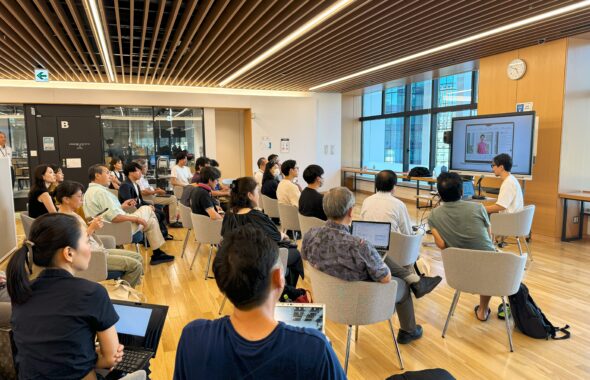
2026年8月19日に開催した第24回では、ChatGPT、Claude、Geminiなど複数のAIをどう使い分け、仕事の流れにつなげるかを考えました。今回の核心は、どのAIが一番優れているかを決めることではありません。文字起こしや要約を一回限りの成果物で終わらせず、蓄積した情報を次の判断や作業に使える「仕事の資産」へ変えることにありました。
この記事でわかること
- 文字起こしを一回限りの議事録で終わらせず、再利用できる知識へ変える考え方
- AIエージェントで記録・整理・判断・共有をつなぐための業務設計
- 繰り返し業務を「スキル」として整理し、人とAIで品質を守る方法
文字起こしを、次の仕事につなげる
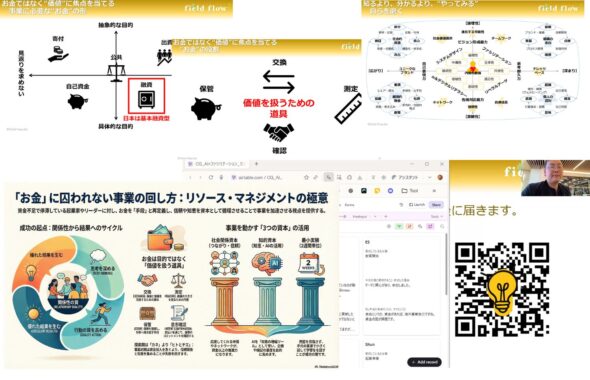
具体例として紹介されたのが、思いついたことを音声で残し、NotionのAI Meeting Notesで文字化し、さらにAIを使って内容を整理しながら資料へ整えていく流れです。参加者からも、NotionやZoomの文字起こしを使っているという声があり、話題は「どう記録するか」から「記録した情報を、その後どう使うか」へ広がっていきました。
現在のNotion公式ヘルプでは、AI Meeting Notesは会議を文字起こしし、要点やアクション項目を整理する機能として案内されています。会議ノートの保存先となるデータベースを設定することもできるため、記録を同じ場所へ蓄積する入口になります。一方で、公式ヘルプは、録音・文字起こしの前に参加者の同意を得ることや、ノートを保存したページの共有権限を確認することも求めています。便利な記録機能を使うほど、何を残し、誰が見られるのかを人が決める必要があります。
文字起こしの精度を上げるだけでは、記録は仕事の資産になりません。どこへ保存するのか、後から検索できる名前や分類になっているか、関連する会議やプロジェクトと結びついているか、利用できる人の範囲は適切か。こうした情報の置き方まで設計して初めて、記録は再利用できる知識基盤になります。
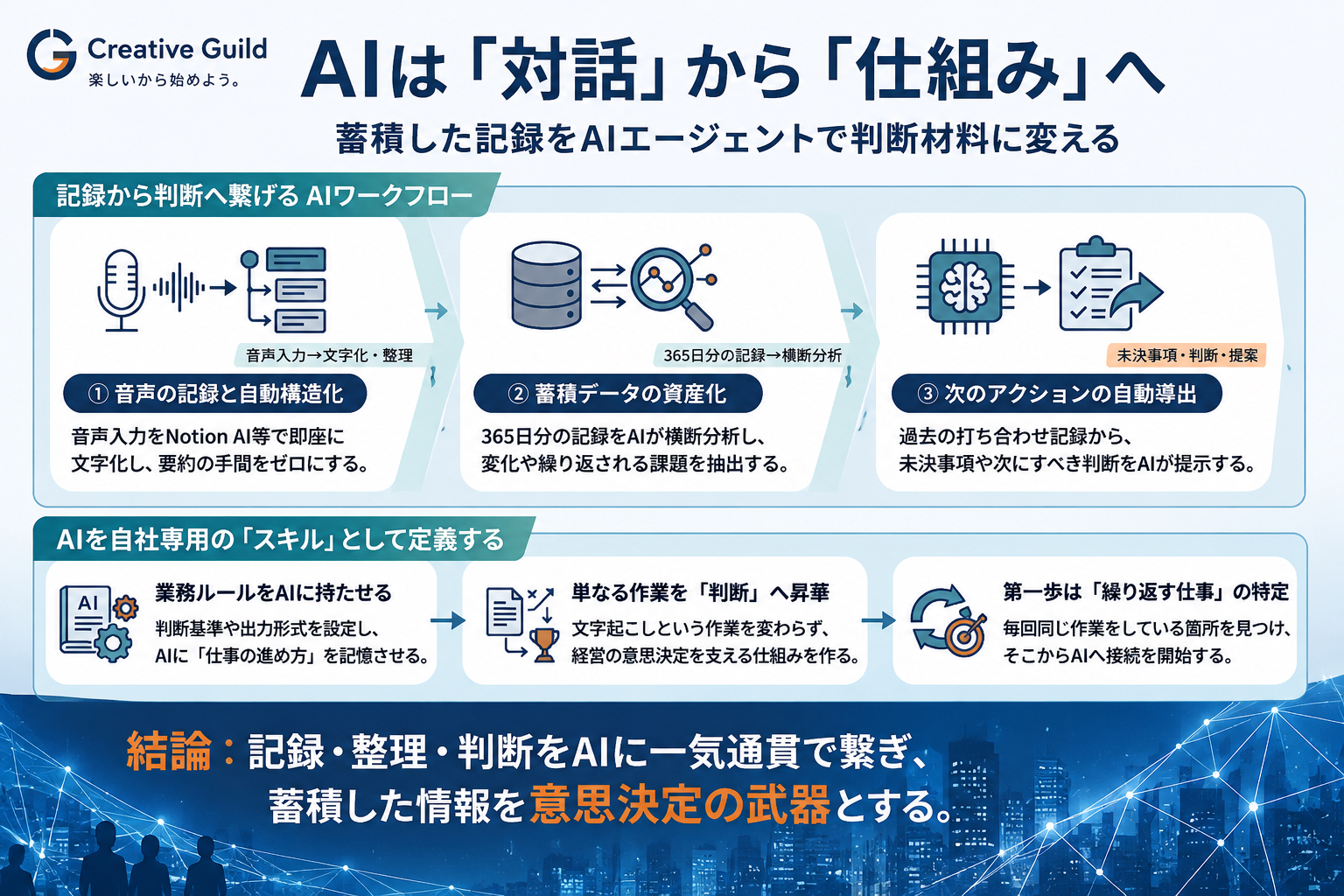
当日は、365日分の記録に売上などの情報を組み合わせて一年を振り返る例や、継続的な打ち合わせ記録から次のアクションや未決事項を整理する例も共有されました。これは、会議の直後に要約を読むだけの使い方とは異なります。3か月、半年、1年と記録が残れば、繰り返し現れる課題、以前決めたことの進捗、関心や判断の変化を時間軸で見直せるようになります。
ただし、AIを人間の記憶そのものとして扱うことはできません。保存されていない出来事は参照できず、文字起こしの誤りや要約時の抜けも起こり得ます。AIが示した振り返りをそのまま事実とせず、元の記録、集計の対象期間、欠けている情報を人が確かめることが大切です。AIは記憶の代わりではなく、蓄積された記録を探索し、並べ直すための補助役と捉える方が現実的です。
AIエージェント化とは、作業をつなぐ設計である
今回の内容を一つの流れにすると、次のようになります。
会話する → 音声を記録する → 文字化する → 内容を整理する → 過去の記録と関連づける → 次のアクションを抽出する → 必要な場所へ共有する
対話型AIでは、この途中で人が内容をコピーし、別のツールへ渡すことが少なくありません。AIエージェント的な活用では、複数の作業を一定のルールでつなぎ、必要な情報を参照しながら次の処理まで進められる状態をつくります。重要なのは、AIが勝手に動くことではなく、仕事を始める条件、参照する情報、処理の順序、保存先、人が確認する地点を先に決めることです。
この方向は一つの製品に限られません。現在、ChatGPTのAppsは外部の情報やツールを参照し、検索や一部の操作へつなぐ仕組みとして案内されています。GeminiのConnected Appsでも、接続した複数のGoogleアプリにある情報を関連づけ、複数段階の依頼を扱う機能が、一部の個人アカウント向けに段階的に提供されています。製品ごとに利用条件、対象プラン、権限設定は異なりますが、AIとの会話を外部の情報や作業へ接続する流れが広がっていることは共通しています。
終盤で関心が集まったのが、AIエージェントの「スキル」です。毎回同じ長い説明を入力する代わりに、処理手順、判断基準、参照資料、出力形式を再利用できる形にしておく考え方です。Claude Codeの公式ドキュメントでは、スキルの中心となるSKILL.mdに指示を書き、必要に応じてテンプレート、参考資料、実行スクリプトなどを同じフォルダに持たせられると説明されています。
スキル化の価値は、AIに便利な機能を増やすことだけではありません。「このレポートでは事実と解釈を分ける」「この顧客向けには特定の表現を避ける」「この数値は元資料まで確認する」といった、経験者が暗黙に行っている判断を言葉にすることにあります。AIへ仕事を渡すために業務を整理すると、人への引き継ぎ、教育、品質管理にも使えるノウハウが残ります。AIエージェントを設計することは、自分たちの仕事を理解し直すことでもあるのです。
一方で、すべてをつなげればよいわけではありません。個人情報や機密情報をどこまで参照させるか、外部へ共有してよい内容か、誤った処理をどう戻すか、重要な操作を誰が承認するかを決める必要があります。とくに削除、上書き、送信、公開など、影響が大きく元に戻しにくい操作は、人が確認する地点を明確にしておくことが欠かせません。
最初は、一つの繰り返し業務から
AIエージェント活用を始めるために、最初から複雑な自動化を目指す必要はありません。まずは毎週、毎月繰り返している仕事を一つ選び、次の五つを書き出してみます。
- 何をきっかけに仕事を始めるのか
- どの情報を入力・参照するのか
- どの順番で処理するのか
- 何を成果物として、どこへ保存するのか
- どこで人が確認し、判断するのか
たとえば勉強会レポートであれば、開催レポートと文字起こしを読み、開催事実と解釈を分け、固有名詞や現在の製品情報を公式資料で確認し、原稿を作り、人が公開前に数字・引用・個人情報を点検する、という流れにできます。今回の勉強会でも、終了後の動画や文字起こしからレポートを作る一連の仕事を、スキルとして整理するアイデアが話題になりました。
AIが何を生成できるかを試す段階から、AIとともにどんな仕事の仕組みをつくるかを考える段階へ。その移行に必要なのは、最新ツールをすべて追いかけることではなく、自分たちが何を記録し、何を大切に判断し、どこを人が担うのかを丁寧に決めることです。
ゆっくりAI勉強会が大切にしているのは、完璧な仕組みを一度でつくることではありません。一つの仕事を選び、小さく試し、結果を見て直し、参加者同士で学びを共有すること。AIが生み出した余白を、人の対話、学び、創造へ返していくことです。次回は、今回も多くの関心が寄せられた「スキル」をテーマに、プロンプトとの違いや仕事への活かし方をさらに掘り下げる予定です。
よくある質問
AIエージェント活用は、どこから始めればよいですか?
毎週・毎月繰り返している仕事を一つ選び、開始条件、参照情報、処理順序、成果物、人が確認する地点を書き出すところから始めます。最初から全自動化せず、一部分だけAIにつなぎ、結果を見ながら直す方が現実的です。
文字起こしを「仕事の資産」にするには何が必要ですか?
精度だけでなく、保存場所、命名・分類、過去の会議やプロジェクトとの関連づけ、検索性、共有権限まで設計する必要があります。蓄積した記録を時間軸で比較できる状態にすると、未決事項や繰り返し現れる課題を見つけやすくなります。
どの作業を人が確認すべきですか?
個人情報や機密情報の利用、外部共有、削除、上書き、送信、公開など、影響が大きく元に戻しにくい操作には人の確認を置きます。AIが作った要約や判断材料についても、元記録、対象期間、欠落情報を確認することが重要です。
関連するCreative Guildの記事
注意書き
※ご留意ください
本記事は、Creative Guildで開催した勉強会の内容をもとに、AIを活用して作成しています。内容の正確性や完全性を保証するものではありません。ご自身の判断や追加の調査とあわせてご活用ください。Creative Guildは、本記事の内容に基づいて生じた結果について責任を負いかねますので、あらかじめご了承ください。
Yukkuri AI Study Session Report Vol. 24
Turning Transcripts into Working Knowledge for AI Agents
Creative Guild is a community that began in Minato City and connects people who want to create enjoyable moments across different places, professions, and communities. Through the Yukkuri AI Study Session, participants explore AI gradually and practically instead of treating it as something distant or difficult.
The 24th session, held on August 19, 2026, examined how tools such as ChatGPT, Claude, and Gemini can be placed within real workflows. The goal was not to decide which AI is the best. The deeper theme was how to prevent transcripts and summaries from becoming one-time outputs and instead turn accumulated information into working knowledge that supports later decisions and tasks.
Connecting Transcripts to the Next Stage of Work
One practical example began with capturing an idea by voice, transcribing it with Notion AI Meeting Notes, and then using AI to organize the content and develop it into a document. Participants also shared that they were using transcription features in tools such as Notion and Zoom. The discussion therefore moved beyond how to record a meeting and toward how recorded information can be used afterward.
According to the current official Notion help page, AI Meeting Notes can transcribe a meeting and identify key points and action items. Users can also choose a default database in which meeting notes are stored, making it easier to accumulate records in one place. At the same time, Notion emphasizes obtaining consent before recording or transcribing a meeting and checking the sharing permissions of the page where the notes are stored. The more convenient recording becomes, the more important it is for people to decide what should be retained and who should be able to access it.
Improving transcription accuracy alone does not turn a record into a reusable asset. The organization of information also matters. Where will the record be stored? Can it be found later through a consistent name or category? Is it connected to the relevant project or previous meeting? Are its access permissions appropriate? Only when these questions are addressed can meeting records become part of a usable knowledge base.
The session included an example of reviewing an entire year by combining 365 days of records with information such as sales data. Another example involved using a series of meeting records to identify unresolved issues and next actions. This is different from reading a summary immediately after a meeting and then leaving it unused. When records accumulate over three months, six months, or a year, people can revisit recurring issues, check whether previous decisions were implemented, and observe how interests and judgments have changed over time.
However, AI should not be treated as human memory itself. It cannot refer to events that were never recorded, and transcription errors or omissions in summaries may remain. AI-generated reflections should therefore be checked against the original material, the relevant time period, and any missing information. A more realistic role for AI is to help people search, compare, and reconstruct accumulated records.
AI Agent Use Is the Design of Connected Work
The workflow discussed in the session can be summarized as follows:
Conversation → audio recording → transcription → organization → connection with previous records → extraction of next actions → sharing in the appropriate place
With conversational AI, people often copy an output and manually move it into the next tool or file. An agent-oriented workflow connects several tasks through defined rules and allows the AI to continue by referring to the necessary information. The important point is not that the AI acts independently without supervision. It is that people define what starts the process, which information may be used, the order of operations, where results are saved, and where human review is required.
This direction is not limited to one product. Apps in ChatGPT are currently described as a way to connect ChatGPT with external information, tools, searches, and selected actions. Through Gemini Connected Apps, a gradually released feature for eligible personal accounts can relate information across connected Google apps and handle multi-step requests. The specific capabilities, eligibility conditions, plans, and permission controls differ by product, but the broader movement toward connecting AI conversations with external information and work is visible across platforms.
Another topic that attracted strong interest was the idea of an AI agent “skill.” Instead of entering the same long explanation every time, a skill makes operating procedures, decision criteria, reference materials, and output formats reusable. The official Claude Code documentation explains that a skill centers on a SKILL.md file and may also include templates, examples, reference documents, and executable scripts.
The value of skill design is not limited to adding a convenient AI feature. It requires people to articulate rules that experienced practitioners often apply without consciously describing them: separate facts from interpretation in this report, avoid certain expressions for this client, or verify this number against the original source. Once this knowledge is made explicit for AI, it can also support human onboarding, education, handover, and quality assurance. Designing an AI agent is therefore also a way of understanding one’s own work more clearly.
Connecting more work does not mean connecting everything without limits. Organizations still need to decide which personal or confidential information the AI may access, what can be shared externally, how incorrect actions can be reversed, and who approves high-impact operations. Deletion, overwriting, sending, and publication are examples of actions that may be difficult to undo. Clear human checkpoints remain essential.
Begin with One Repeated Task
There is no need to begin with a complex automation project. A practical starting point is to choose one task that repeats every week or every month and write down five elements:
- What event or input starts the work?
- Which information should be provided or referenced?
- In what order should the work proceed?
- What is the expected output, and where should it be stored?
- Where must a person review and make a decision?
For a study-session report, the process might include reading the event report and transcript, separating event facts from interpretation, confirming product names and current features through official sources, producing a draft, and having a person review numbers, quotations, and personal information before publication. During this session, participants also discussed the idea of turning the process from video and transcript to final report into a reusable skill.
AI use is moving from experimenting with what a model can generate toward designing how people and AI can work together over time. That transition does not require following every new tool. It requires careful decisions about what should be recorded, which judgments matter, and which responsibilities must remain human.
The Yukkuri AI Study Session does not aim to create a perfect system in a single attempt. It encourages participants to choose one task, test a small workflow, review the result, improve it, and share the learning with others. The goal is to return the white space created by AI to human dialogue, learning, and creativity. The next session is expected to examine skills in greater depth, including how they differ from individual prompts and how they can be used in real work.
Disclaimer
Please note:
This article was created with AI assistance based on a study session hosted by Creative Guild. Its accuracy and completeness cannot be guaranteed. Please use your own judgment and conduct additional research where appropriate. Creative Guild cannot accept responsibility for decisions or outcomes based on this article.

この記事へのコメントはありません。